
If you are planning to export or import goods from India, the very first thing you will need is an IEC code. Before you generate a commercial invoice, before you book a shipment, before you open a foreign currency account – the IEC comes first.
In this guide, we explain exactly what an IEC code is, who needs it, what documents you will need, and how to apply online through the DGFT portal in a few simple steps. This is the same process thousands of new Indian exporters follow every year to get started legally.
| Key Details | Information |
|---|---|
| Official Portal | dgft.gov.in |
| Article Topic | IEC Code Registration & Process (2026) |
| Application Fee | ₹500 (One-time government fee) |
| Processing Time | 1 to 3 Working Days |
| Validity | Lifetime (Annual update mandatory) |
| Mandatory Documents | PAN Card, Cancelled Cheque, Address Proof |
What is IEC Code? (Full Form and Meaning)
IEC full form is Import Export Code. It is a unique 10-digit identification number issued by the Directorate General of Foreign Trade (DGFT), under the Ministry of Commerce and Industry, Government of India.
Think of it as a PAN card for international trade. Just as your PAN is mandatory for tax transactions inside India, your IEC is mandatory the moment you move goods or services across India’s borders.
The IEC is governed by the Foreign Trade (Development and Regulation) Act, 1992. It is permanent – once issued, it has lifetime validity and does not expire. However, you must update your IEC profile on the DGFT portal once every year (between April and June) to keep it active.
Key fact: Your IEC number is the same as your PAN number. The DGFT uses your PAN as the base identifier and issues the IEC against it. One PAN = One IEC. You cannot apply for a second IEC on the same PAN.
Who Needs an IEC Code?
For Goods (Products)
If you are importing or exporting physical goods – whether you manufacture them yourself or trade them – an IEC is compulsory from day one. There is no minimum turnover threshold. Even a first-time exporter sending one shipment needs it.
For Services
Service exporters (IT companies, consultants, designers, etc.) do not need an IEC simply to invoice a foreign client. However, if you plan to claim government export benefits such as SEIS or RoDTEP, or want smooth processing of inward foreign remittances through your bank, having an IEC linked to your business is strongly recommended to avoid delays or compliance queries.
Who is Exempt?
The government has exempted certain categories from IEC, including individuals importing or exporting goods for personal use (not for trade or manufacture) and government departments and ministries. For everyone else engaged in commercial trade, IEC is mandatory.
Entity Types That Can Apply
- Sole Proprietorship
- Partnership Firm
- Limited Liability Partnership (LLP)
- Private Limited Company
- One Person Company (OPC)
- Trust, HUF, Society
Documents Required for IEC Code Registration
The exact documents depend on your business structure. Here is a complete list organised by entity type:
Documents Required for All Entities
- PAN Card – Individual PAN for proprietorship; Company/Firm PAN for others
- Address Proof of Business Premises – Electricity bill, telephone bill (postpaid), rent agreement, or sale deed
- Cancelled Cheque – Of the current account in the firm’s name (or a bank certificate in the prescribed format)
- Passport-size photograph of the proprietor/director/partner
Note: While GST is optional for the IEC application, once you have your code, you will need to link it with a GST LUT filing to enjoy tax-free exports.
Additional Documents by Entity Type
| Entity Type | Additional Document Needed |
|---|---|
| Proprietorship | GST certificate or MSME registration (optional but helpful); Aadhaar for e-sign |
| Partnership Firm | Partnership Deed (mandatory) |
| LLP / Private Limited | Certificate of Incorporation from MCA; Digital Signature Certificate (DSC) for signing |
| HUF | HUF deed and PAN of HUF |
Important notes on address proof:
- If the premises are rented, the rent agreement must be in the applicant’s name (or proprietor’s name for a proprietorship)
- For proprietors, Aadhaar card or Voter ID can also serve as address proof if the address matches
- If the property belongs to someone else, you can submit a No Objection Certificate (NOC) from the property owner along with their address proof
GST registration is not mandatory for applying for an IEC. However, if you have it, it makes the process smoother.
How to Apply for IEC Code Online – Step-by-Step DGFT Guide (2026)
The entire IEC application process is online. There is no physical visit required. Here are the steps exactly as they appear on the DGFT portal:
Step 1: Visit the DGFT Portal
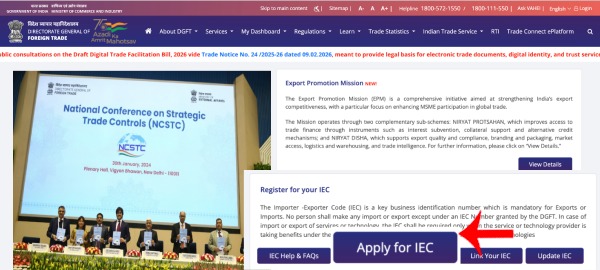
Go to dgft.gov.in. On the homepage, you will see an option that says “Apply for IEC”. Before you can apply, you need to create an account on the portal.
Step 2: Register as a New User
Click on Register and select “Importer/Exporter” as your user type. Fill in the registration form with:
- First name and Last name
- Email address (active – your login credentials will arrive here)
- Mobile number
- Pin code, District, State, and City
- Captcha code
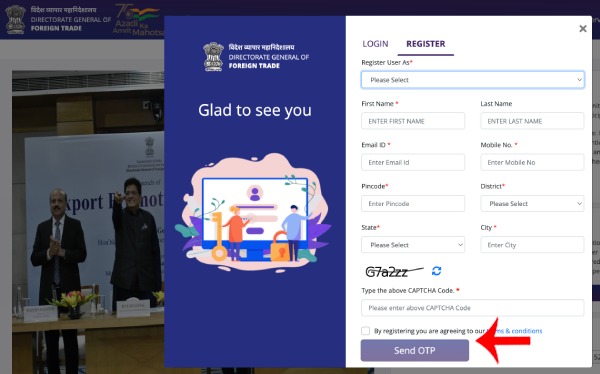
Submit and verify the OTP sent to your email or mobile. Once verified, you will receive a welcome email from DGFT with your username (your email ID) and a temporary password. Log in and change your password immediately.
Step 3: Start a Fresh IEC Application
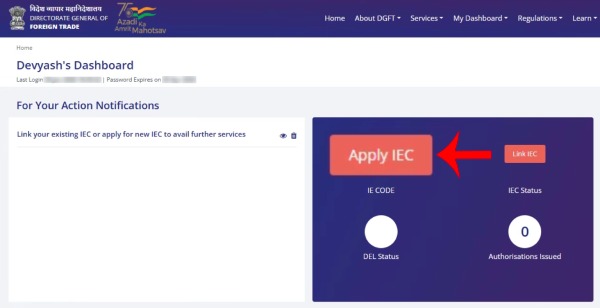
After logging in, you will see your dashboard. Click on “Apply IEC”. If you have no existing application, scroll down and click “Start Fresh Application”. The application form (ANF-2A) will open with approximately six tabs that you must fill one by one.
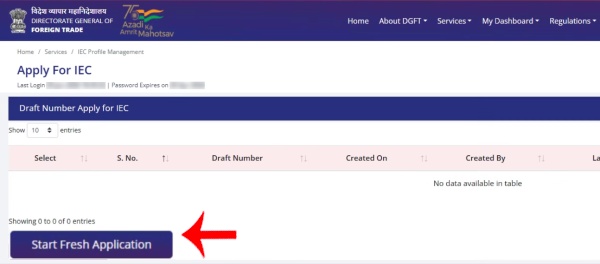
Step 4: Fill Tab 1 – Basic Details
This is the most important section. Fill in the following:
- Nature of Concern – Select your entity type: Proprietorship, Partnership, LLP, or Private Company
- Firm/Trade Name – The name under which your business operates (as on your GST or trade documents)
- PAN Number – For a proprietorship, enter your personal PAN. For a company, enter the company PAN
- Date of Birth (for individuals) or Date of Incorporation (for companies)
- Category of Exporter – Choose from: Merchant Exporter, Manufacturer Exporter, Service Provider, or Merchant-cum-Manufacturer Exporter
- SEZ – If your firm is located in a Special Economic Zone, select Yes. Otherwise, select No
- GST Number – Optional. Enter if you have one
- Mobile number and email – Auto-populated from your registration
- Proof of Entity (NdT Certificate) – For proprietors, you can upload your MSME certificate (optional). For Partnership and LLP, this is mandatory (Partnership Deed or MCA Certificate)
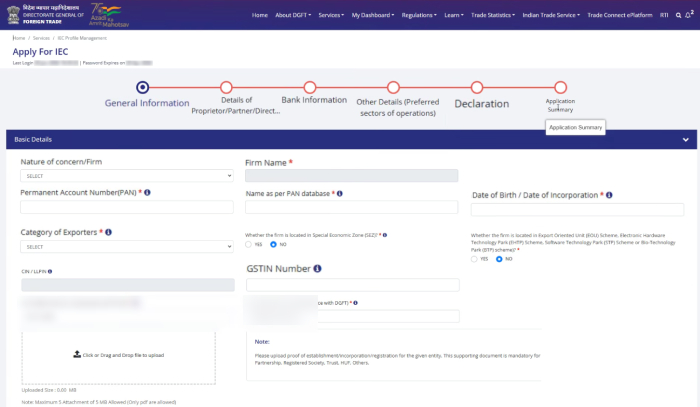
Step 5: Fill Tab 2 – Firm Address Details
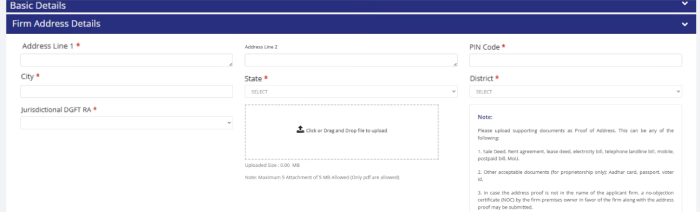
Enter your business address – flat/shop number, street, city, pin code, and district. Upload your address proof document here. Accepted documents for proprietorship include rent agreement, Aadhaar card, Voter ID, or passport (with matching address). Save the tab. A draft application number will be generated at this point – note it down.
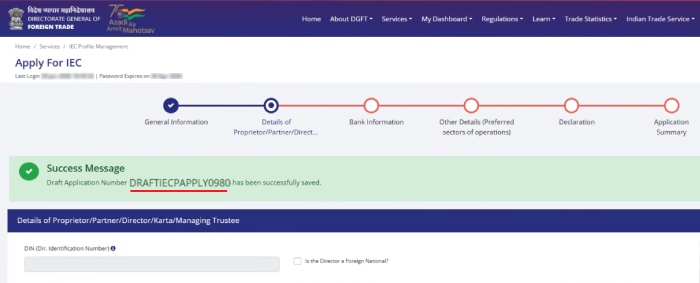
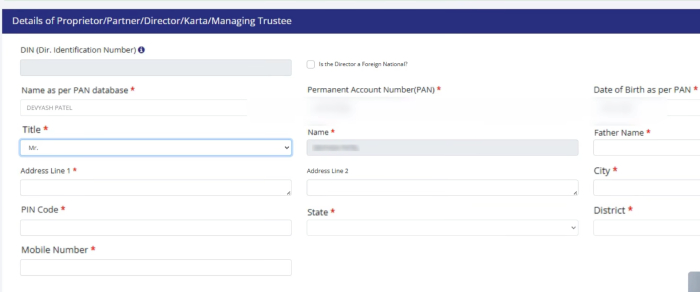
Step 6: Fill Tab 3 – Proprietor / Partner / Director Details
For a proprietorship, your details will already appear pre-filled. Click Edit and confirm or update:
- Title, Father’s name
- Personal residential address (must match Aadhaar)
- Personal mobile number
For a company or LLP, add details of all directors or partners here.
Step 7: Fill Tab 4 – Bank Account Details
Enter your firm’s current bank account details:
- Bank name (most major banks are listed in the dropdown)
- Account number and IFSC code
- Upload a cancelled cheque or a bank certificate in the DGFT-prescribed format (available as a downloadable template on the portal)
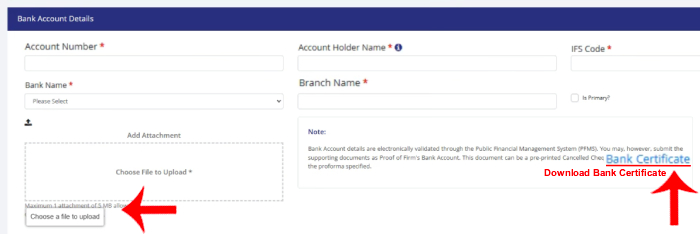
Note: Some banks may require you to get a bank certificate stamped by the branch manager instead of a cancelled cheque. Check with your bank if you are unsure.
Step 8: Fill Tab 5 – Import/Export Activity Details
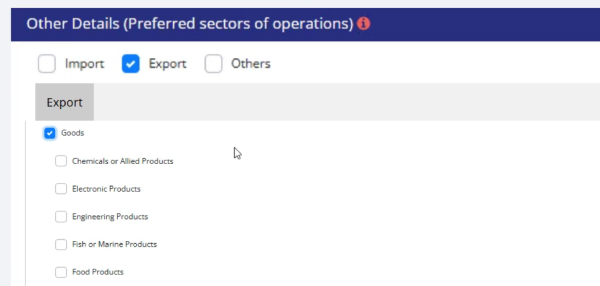
Select what you plan to do – Import, Export, or Both. Then select the category:
- Goods – Choose the relevant product category (Handicrafts, Leather goods, Textiles, Engineering goods, etc.). An “Others” option is available if your category is not listed
- Services – Choose from IT services, Accounting, Bookkeeping, Consulting, etc.
Step 9: Declaration and Preview
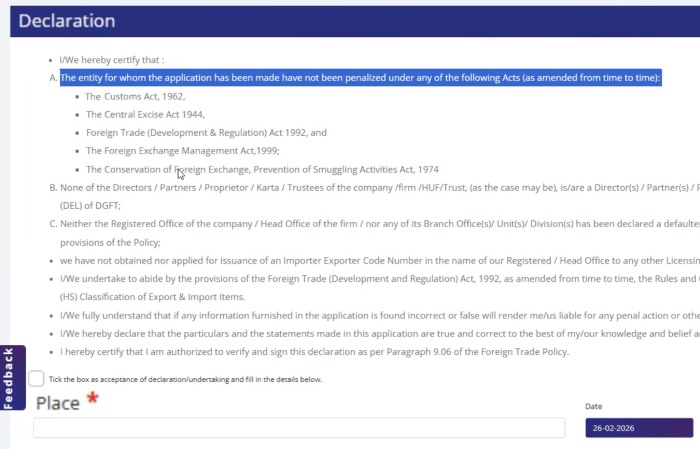
The final tab asks for a declaration. Enter your city/place name and click Save & Next. The portal will show you a full preview of your application. Review all details carefully – you cannot edit after signing.
Step 10: Sign and Pay
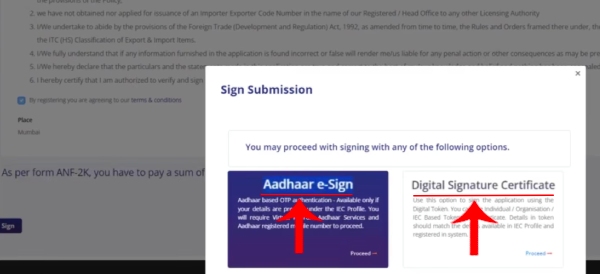
Click the Sign button. You will be asked to choose your signing method:
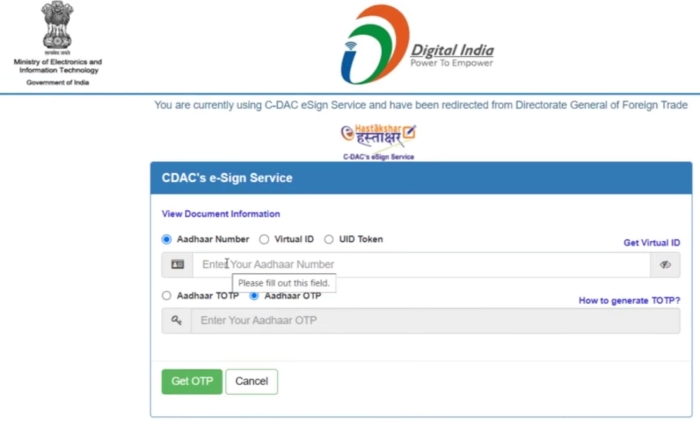
- Aadhaar e-Sign – Recommended for proprietors. Enter your Aadhaar number, receive an OTP on your Aadhaar-linked mobile, and confirm
- Digital Signature Certificate (DSC) – Required for companies and LLPs
After signing, pay the government fee of ₹500 through the Bharatkosh payment gateway (Net Banking, Debit Card, Credit Card, or UPI all accepted).
Step 11: Download Your IEC Certificate
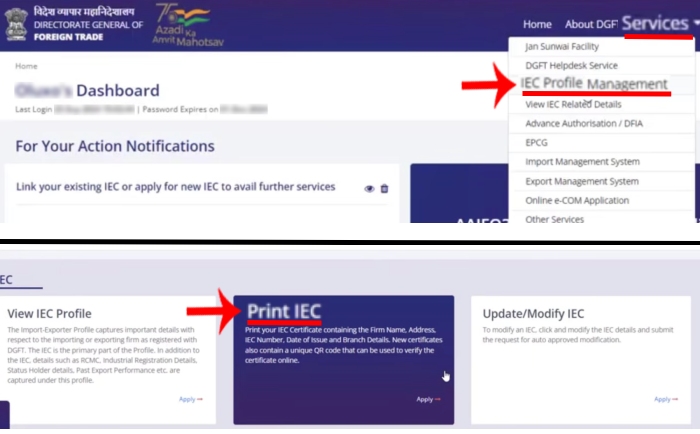
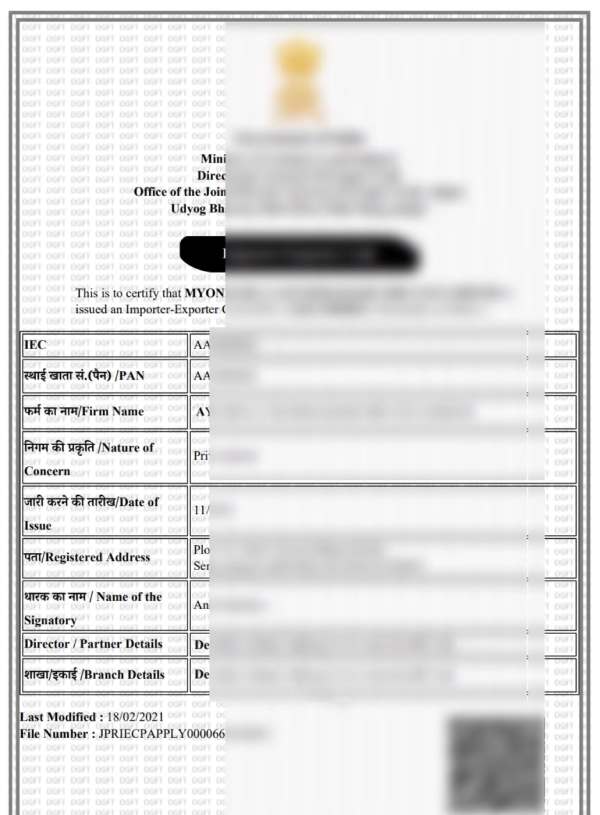
Your IEC certificate is typically issued within 1 to 2 working days. You will receive an email notification. To download it from the portal: log in → go to Services → IEC Profile Management → Print IEC. The certificate will be a digitally signed PDF containing:
- Your firm name and registered address
- Your 10-digit IEC number (same as your PAN)
- Date of issue and branch details
- A QR code for online verification
Pro tip: Keep a soft copy of your IEC certificate in a folder along with your other export documents. You will need to quote your IEC on every shipping bill, commercial invoice, and bank remittance instruction throughout your export journey.
IEC Code Application – Fee and Processing Time
| Detail | Information |
|---|---|
| Government Fee | ₹500 (flat, one-time) |
| Processing Time | 1 to 3 working days |
| Validity | Lifetime (no renewal, but annual update required) |
| Annual Update Window | April to June each year |
| Portal | dgft.gov.in |
Expert Tip (Avadhut Taru): Don’t wait until June. The DGFT portal usually slows down due to heavy traffic in the last week, which can lead to timeouts. To stay safe, complete your IEC update by May 15.
Benefits of Having an IEC Code
Getting your IEC is not just a compliance checkbox. It unlocks practical advantages:
- Legal authority to export and import – Without IEC, customs will not clear your shipment
- Access to government export incentive schemes – RoDTEP, MEIS, SEIS, and Export Promotion Council benefits all require a valid IEC
- Foreign currency transactions – Banks require IEC to process inward remittances from foreign buyers
- Customs clearance – IEC must be quoted on every shipping bill and bill of entry
- E-commerce exports – Platforms like Amazon Global Selling, Etsy, and Alibaba require IEC for international shipments
- No compliance burden – Unlike GST, IEC does not require monthly or annual return filings
Common Mistakes to Avoid When Applying for IEC
- PAN mismatch – The name on your PAN must exactly match what you enter in the form. Even a spelling difference causes rejection
- Address mismatch – The address on your proof document must match the address you fill in the form
- Wrong bank details – Double-check your account number and IFSC code before submitting
- Blurry document scans – Upload clear, legible PDFs. Blurry images are a common rejection reason
- Using the wrong PAN – For a proprietorship, use your personal PAN. For a company, use the company PAN – not a director’s personal PAN
- Skipping the annual update – Forgetting to update your IEC profile between April and June will deactivate your code
- Bank Account Title Mismatch: Ensure the name on your cancelled cheque matches the Firm Name exactly. If your firm is “ABC Exports” but the cheque says “Avadhut Taru (Proprietor),” your application will likely be rejected.
- Address Proof Dates: If using a utility bill (Electricity/Telephone), ensure it is not older than 3 months from the date of application.
What to Do After Getting Your IEC Code
Once your IEC is active, you are legally an exporter, but your tax setup isn’t finished. You must file a Letter of Undertaking (LUT) on the GST portal before raising your first export invoice. This is what allows you to export goods or services without paying 18% or 12% IGST upfront, saving your business significant cash flow.
Once your IEC certificate is in hand, you are officially authorised to export from India. The next immediate step is to prepare your export documentation correctly – starting with your Commercial Invoice.
A commercial invoice is the primary document your buyer needs, your bank needs for remittance, and customs needs for clearance. Getting the format right matters – incorrect invoices lead to payment delays and customs holds.
Your bank will also use your IEC details while processing foreign remittances from buyers, so ensure your IEC information is correctly reflected in your invoice and bank records to avoid delays.
You can create a professional, IEC-ready commercial invoice instantly using our free tool: [Export Invoice Generator – Free Online Tool for Indian Exporters]. No registration needed, no software to install – just fill in your details and download a print-ready PDF.
What is IEC code in full form?
IEC stands for Import Export Code. It is a 10-digit unique identification number issued by the Directorate General of Foreign Trade (DGFT) under the Ministry of Commerce and Industry, Government of India. It is mandatory for any individual or business that wants to legally import or export goods from India.
How do I apply for IEC code online?
You can apply for an IEC code online at the official DGFT portal – dgft.gov.in. Register as a new user, log in, click “Apply IEC Code,” fill in your business details across six tabs, upload the required documents, sign using Aadhaar e-Sign (for proprietors) or DSC (for companies), and pay ₹500 online. Your IEC certificate is typically issued within 1 to 2 working days.
What is the fee for IEC code registration?
The government fee for applying for an IEC code is ₹500, payable online through the Bharatkosh payment gateway on the DGFT portal. This is a one-time fee. There is no annual renewal fee, but you must update your IEC profile on the portal every year between April and June at no cost.
What documents are required for IEC code?
The basic documents required are: (1) PAN card of the individual or firm, (2) address proof of the business premises such as an electricity bill, rent agreement, or Aadhaar card, (3) cancelled cheque or bank certificate of the firm’s current account, and (4) for companies and LLPs, a Certificate of Incorporation or Partnership Deed is also required. GST registration is not mandatory.
How long does it take to get an IEC code?
The IEC code is usually issued within 1 to 3 working days after submitting a complete application on the DGFT portal. If your documents are accurate and there are no mismatches, approval is often faster – sometimes within 24 hours. You will receive an email with your IEC number and a downloadable certificate.
Does IEC code expire?
No, an IEC code has lifetime validity and does not expire. However, since 2022, the DGFT requires all IEC holders to update their profile details once every year on the DGFT portal between April and June. If you skip this annual update, your IEC may be deactivated. Reactivation is possible by completing the update.
Is IEC code the same as PAN?
Yes, effectively. After the introduction of GST, the DGFT aligned IEC numbers with PAN numbers. Your 10-digit IEC number will be the same as your PAN number. However, you still need to formally apply for and receive an IEC through the DGFT portal – having a PAN alone does not automatically give you an IEC.
Is IEC code mandatory for service exporters?
Not always. Service exporters such as IT companies, consultants, and designers do not need an IEC just to provide services to foreign clients. However, if you want to claim government export incentive schemes like SEIS or RoDTEP benefits, or if you need to receive regulated foreign payments under certain banking categories, an IEC becomes necessary.
What do I need after getting my IEC code?
Once you have your IEC, the next step is to prepare your export documents. The most important document for every export shipment is a Commercial Invoice. You can create a correctly formatted, IEC-ready commercial invoice using our free [Export Invoice Generator] – built specifically for Indian exporters.

Avadhut Taru is the founder of ImpexKit, an engineer by background, and a researcher focused on simplifying import-export documentation and compliance for Indian businesses. Through detailed study of GST regulations, DGFT procedures, customs rules, and exporter compliance requirements, he creates practical tools and educational guides designed to make trade paperwork simpler, faster, and more accessible for Indian exporters.