
If you are an Indian exporter, there is one GST compliance task that must be completed every year before you raise your first export invoice – filing your LUT (Letter of Undertaking) in Form RFD-11 on the GST portal.
Miss this and you will be required to pay IGST on every export, then wait months to get a refund. File it on time and you export at zero GST – no upfront payment, no refund paperwork, no working capital blockage.
This guide explains what LUT means, who needs it, what you need to file, and the exact step-by-step process on the GST portal – drawn from the actual filing screen.
| Key Details | Information |
|---|---|
| Official Portal | gst.gov.in |
| Form Name | GST RFD-11 (Letter of Undertaking) |
| Filing Fee | ₹0 (Completely Free) |
| Validity | One Financial Year (Expires March 31) |
| Processing Time | Instant (Immediate ARN Generation) |
| Mandatory Requirement | 2 Witnesses & GST Registration |
What is LUT in GST? (Full Form and Meaning)
LUT full form is Letter of Undertaking. It is a self-declaration filed by exporters on the GST portal under Form GST RFD-11, governed by Rule 96A of the CGST Rules, 2017.
When you file an LUT, you give the government three key undertakings:
- You will export goods within 3 months from the invoice date (for service exports, proceeds must be realised within 1 year)
- You will comply with all GST laws applicable to exports
- If you fail to export or receive payment, you will pay the IGST due along with 18% interest per annum
In return, the government allows you to raise export invoices at 0% IGST – no upfront tax payment required. This is what makes LUT one of the most important compliance steps for any regular exporter.
Key fact: Under GST, exports are classified as “zero-rated supplies.” The LUT is the mechanism that makes this practically usable – without it, you would need to pay IGST first and claim a refund later, which can take 2 to 6 months and blocks your working capital.
Who Needs to File LUT?
Any GST-registered taxpayer who wants to export goods or services without paying IGST must file an LUT. This includes:
- Exporters of goods to foreign countries
- Exporters of services (IT companies, consultants, designers, freelancers, etc.)
- Suppliers to Special Economic Zones (SEZ units and SEZ developers)
There is no minimum turnover requirement. Even a first-time exporter or a small business can and should file an LUT.
Who Cannot File LUT?
If you have been prosecuted for tax evasion exceeding ₹2.5 crore under GST or any earlier tax law, you are not eligible for LUT. You must instead submit an Export Bond with a bank guarantee. For the vast majority of exporters, this condition is not applicable.
LUT vs Paying IGST and Claiming Refund – Which is Better?
| Factor | File LUT (Recommended) | Pay IGST + Claim Refund |
|---|---|---|
| Upfront cash outflow | None | Yes – full IGST amount |
| Refund process | Not needed | Required (takes 2-6 months) |
| Working capital impact | No impact | Capital blocked till refund |
| Paperwork | One annual filing | Monthly refund claims |
| Best for | All regular exporters | One-time or rare exporters |
Almost every regular Indian exporter files an LUT. It is the straightforward, cash-flow-friendly route.
LUT Deadline – Why March 31 Matters
An LUT is valid for one financial year – from April 1 to March 31. It is not a lifetime registration. You must file a fresh LUT every year.
The filing deadline for FY 2026-27 is March 31, 2026. If you want to export from April 1, 2026 onwards without paying IGST, your LUT for FY 2026-27 must be filed before that date.
What happens if you miss the deadline?
- Any export invoices raised after April 1 without a valid LUT will attract IGST
- You will have to pay the IGST and then file for a refund – there is no retroactive LUT option for past invoices
- Exporting under an expired LUT can also attract interest of 18% per annum on the IGST amount
Practical tip: Many exporters file their LUT for the new financial year in the last week of March or even in early April before raising the first export invoice of the year. Filing in early April (before your first export invoice) is also acceptable – the LUT covers you from the date of filing onwards.
What You Need Before Filing LUT (Form RFD-11)
No documents need to be uploaded in most cases. However, you must have the following information ready before you start:
- GST portal login credentials – your GSTIN, user ID and password
- Financial year for which you are filing (e.g., 2026-27)
- Two independent witness details – full name, complete residential address with PIN code, and occupation of each witness. These should not be family members of the proprietor, partners, or directors.
- The witnesses do not need to sign any physical paper or provide an OTP. You only need their name and address. They can be your employees or friends, provided they are not the authorised signatories themselves and are not close family members (blood relatives).
- Place of filing – the city from which you are filing the form
- Authorised signatory details – the name of the person authorised under your GST registration to sign the form
- Signing method – EVC (OTP-based, recommended for proprietors and partners) or DSC (Digital Signature Certificate, required for companies and LLPs)
- Previous year’s LUT copy (optional) – if you have filed LUT before, you can upload the previous acknowledgement as a PDF or JPEG (max 2MB). First-time filers can skip this
How to File LUT on the GST Portal – Step-by-Step (Form RFD-11)
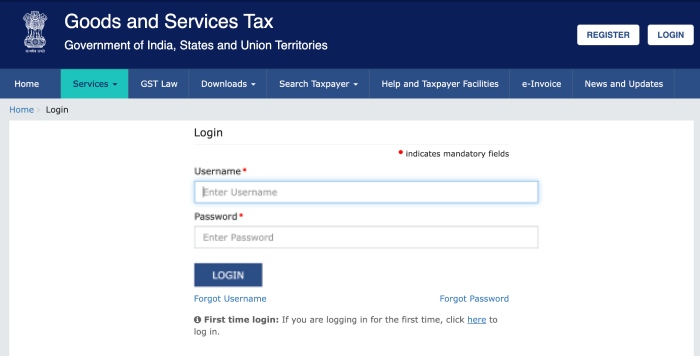
Step 1: Log In to the GST Portal
Go to gst.gov.in and log in with your GSTIN, username, and password.
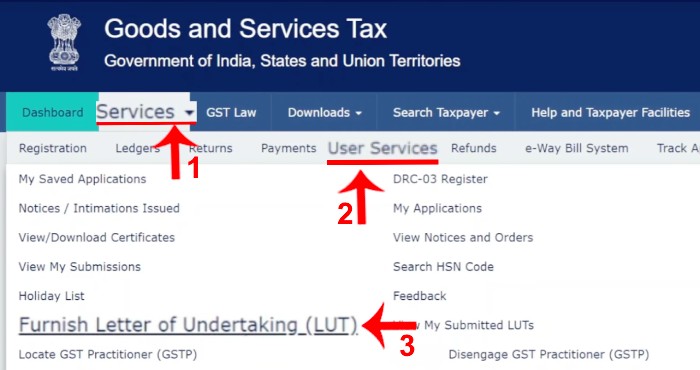
Step 2: Navigate to Furnish LUT
From the top menu, click on Services → User Services → Furnish Letter of Undertaking (LUT). The Form RFD-11 will open on screen.
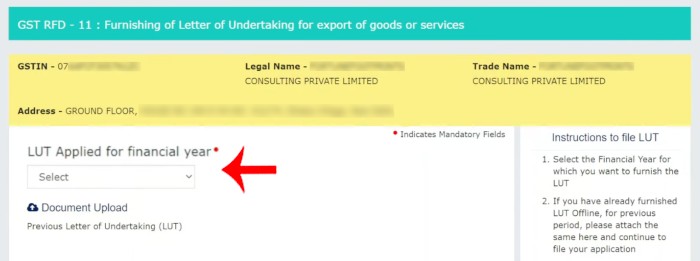
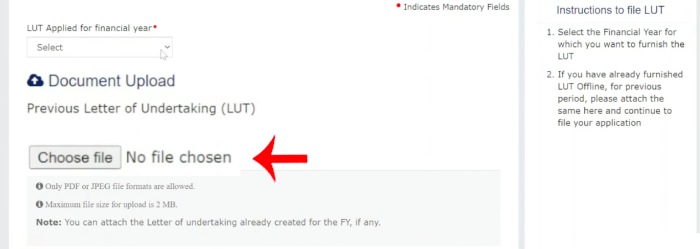
Step 3: Select the Financial Year
From the dropdown, select the financial year for which you are filing. For example, select 2026-27 if you want LUT coverage from April 1, 2026. Each LUT covers only the financial year you select – April 1 to March 31.
Step 4: Upload Previous Year’s LUT (Optional)
If you have filed LUT before, you can upload your previous year’s acknowledgement here (PDF or JPEG format, maximum 2MB). This is optional and is simply for reference. First-time filers can skip this step entirely.
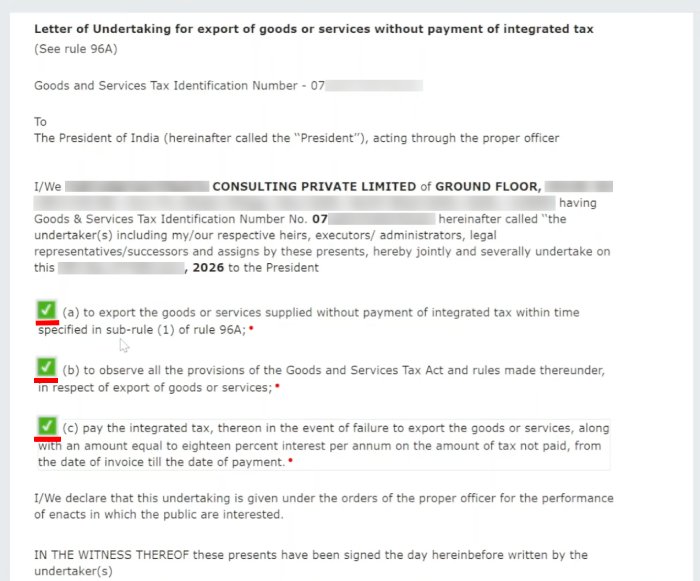
Step 5: Tick All Three Declaration Checkboxes
The form displays three self-declaration checkboxes. You must tick all three. These are standard declarations confirming that you will export within the prescribed time, comply with GST laws, and pay IGST with 18% interest if you fail to export. Tick all three – this is straightforward and non-negotiable.
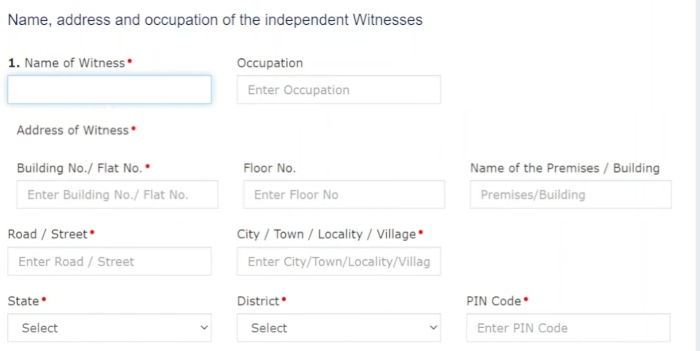
Step 6: Enter Witness 1 Details
Fill in the details of your first witness:
- Name – Full name of the witness
- Occupation – Their profession or job (e.g., “Service” if they are employed, “Business” if they run a business)
- Address – Full residential address with PIN code
Step 7: Enter Witness 2 Details
Repeat the same for your second witness – name, occupation, and full residential address. Two witnesses are mandatory. They do not need to be present physically – you only need to provide their details on the form.
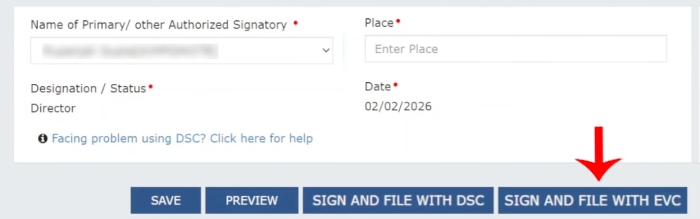
Step 8: Enter Place of Filing and Select Authorised Signatory
Enter the city from which you are filing the form (your business location). Then select the authorised signatory from the dropdown – this will show the names of persons authorised under your GST registration.
Step 9: Sign and Submit
Choose your signing method:
- EVC (Electronic Verification Code) – Recommended for proprietors and partnership firms. Click EVC, then Proceed. An OTP will be sent to your registered mobile or email. Enter the OTP and click Verify.
- DSC (Digital Signature Certificate) – Required for Private Limited Companies and LLPs. Connect your DSC token and sign.
Once verified, your form is submitted. No further submission is needed – this is final.
Step 10: Download Your LUT Acknowledgement (ARN)
After submission, an ARN (Application Reference Number) is generated immediately. Your LUT is deemed approved – under GST Circular No. 40/14/2018-GST, if the officer takes no action within 3 working days, the LUT stands automatically approved.
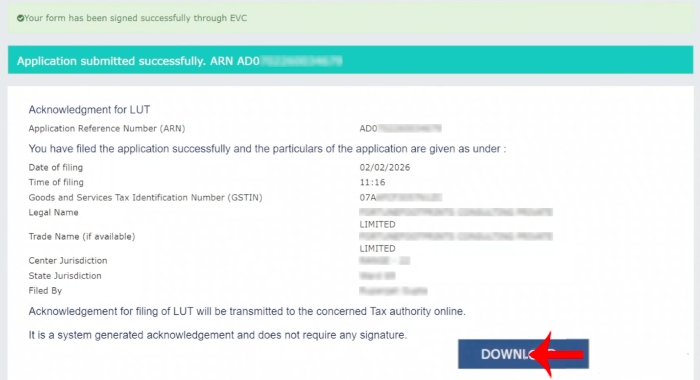
To download your LUT certificate: go to Services → User Services → View My Submitted LUTs and download the PDF. Save this certificate – you will need it for export documentation, bank remittances, and next year’s renewal upload.
Important: Quote your LUT ARN on your export invoices. Your export invoice should also show “Supply meant for export under LUT without payment of IGST” along with your IEC and GSTIN. Once you have both your LUT filed and your export invoice ready, you are fully set to ship.
LUT Filed – What Comes Next?
If you export goods (not services), make sure you also have a valid IEC Code from DGFT – both IEC and LUT are required before your first shipment.
Once your LUT is in place for the financial year, you can raise export invoices at zero IGST for all your shipments through March 31. The LUT number (ARN) must be referenced on each invoice.
Expert Tip (Avadhut Taru): If you are a service exporter, make sure your FIRC (Foreign Inward Remittance Certificate) or FIRA matches the value mentioned in your export invoice. Also, export proceeds must be realised within 1 year-if there is a delay, you should apply for an extension from your authorised bank to stay compliant.
The next document your buyer, bank, and customs need is a correctly formatted Commercial Export Invoice. This invoice must include your IEC, GSTIN, LUT reference, foreign currency value, HS code, and other India-specific fields – a standard template often misses several of these.
You can create a compliant, ready-to-use export invoice directly using our free tool: [Export Invoice Generator – Free Online Tool for Indian Exporters]. It includes the LUT declaration field, GSTIN, IEC, and all required export fields built in – no registration, no software needed.
What is LUT in GST?
LUT stands for Letter of Undertaking. It is a declaration filed by exporters on the GST portal in Form GST RFD-11 under Rule 96A of the CGST Rules, 2017. Filing an LUT allows you to export goods or services without paying IGST upfront. Instead of paying tax and claiming a refund later, the LUT route lets you raise export invoices at zero IGST, keeping your working capital free.
What is the deadline to file LUT for FY 2026-27?
The deadline to file LUT for FY 2026-27 is March 31, 2026. You must file Form RFD-11 on the GST portal before this date to ensure you can export without paying IGST from April 1, 2026 onwards. If you miss the deadline, any export invoices raised in the new financial year without a valid LUT will attract IGST, which you will have to pay and then claim as a refund.
How long is LUT valid?
An LUT is valid for one financial year – from April 1 to March 31. It does not have lifetime validity. You must file a fresh LUT every year before the start of the new financial year (or before your first export invoice of the year). There is no government fee for filing or renewing an LUT.
What is Form RFD-11?
Form RFD-11 is the official GST form used to file a Letter of Undertaking (LUT). It is filed online on the GST portal at gst.gov.in. The form captures your business details, two witness details, three self-declaration checkboxes, and is signed using Aadhaar EVC (for proprietors and partners) or a Digital Signature Certificate (for companies and LLPs).
What documents are needed to file LUT?
No documents need to be uploaded for most LUT filings. You only need to have the following information ready: your GST login credentials, the financial year for which you are filing, the name, occupation, and full address of two independent witnesses, your place of filing (city), and your authorised signatory details. If you have filed LUT in a previous year, you can optionally upload that acknowledgement as a PDF or JPEG (max 2MB).
Who are the two witnesses required for LUT filing?
The LUT form requires the name, full residential address, and occupation of two independent witnesses. They do not need to be physically present – you only enter their details in the form. The witnesses should not be close family members of the proprietor, partners, or directors. They can be employees, business associates, friends, or any other independent adult.
What happens if I export without filing LUT?
If you raise export invoices without a valid LUT in place, you are required to pay IGST on those exports at the applicable rate. You can then file for a GST refund (Form RFD-01), but refund processing typically takes 2 to 6 months and blocks your working capital. Additionally, exporting without LUT when it was required can attract interest at 18% per annum on the IGST amount.
Is LUT filing free?
Yes, there is no government fee to file or renew an LUT on the GST portal. The process is completely free. You only need your GST login, witness details, and a few minutes to complete the form online.
What should I do after filing LUT?
After your LUT is filed, download and save the acknowledgement PDF with your ARN number. Quote your LUT ARN on all your export invoices for the year. Your invoice should state that the supply is being made under LUT without payment of IGST. The next step is to prepare a correctly formatted export commercial invoice with your IEC, GSTIN, LUT reference, HS code, and foreign currency value. You can use our free [Export Invoice Generator] to create a compliant export invoice instantly.

Avadhut Taru is the founder of ImpexKit, an engineer by background, and a researcher focused on simplifying import-export documentation and compliance for Indian businesses. Through detailed study of GST regulations, DGFT procedures, customs rules, and exporter compliance requirements, he creates practical tools and educational guides designed to make trade paperwork simpler, faster, and more accessible for Indian exporters.